 BedrockBridge
LAN Game Default
The easiest way. The server appears in your console's Friends tab like a friend's world. Nothing to change on the console.
For PlayStation · Xbox · Nintendo Switch
Consoles can only join a handful of Featured Servers in Minecraft: Bedrock Edition. BedrockBridge runs on your iPhone, iPad or Mac and makes any server show up on your console: DonutSMP, 2b2tPE, a friend's server, anything.
Free · No ads · No accounts · Coming soon to the App Store
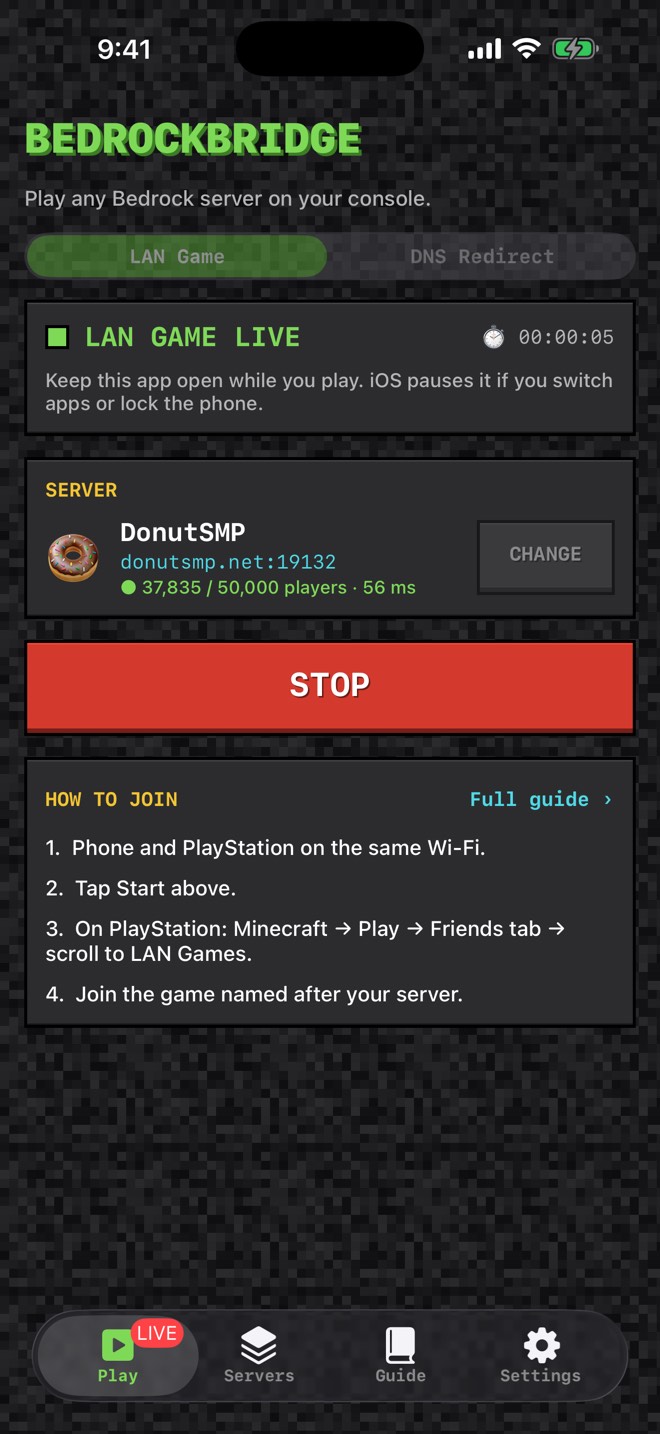
Your console thinks the server is a game on your local network. BedrockBridge answers its "who's playing nearby?" search and quietly forwards everything to the real server.
Put your console and your iPhone, iPad or Mac on the same network.
Choose a server in BedrockBridge, or type any address, and press Start.
Minecraft → Play → Friends tab → LAN Games. Your server is waiting there.
The easiest way. The server appears in your console's Friends tab like a friend's world. Nothing to change on the console.
For networks that block LAN discovery. Set your console's DNS to the address BedrockBridge shows, open any Featured Server, and a server list appears where you can type any address.
A single Start button, live status and uptime. Stop with one more tap.
See how many people are online and your ping for every saved server.
DonutSMP, The Hive, CubeCraft, 2b2tPE and more, ready to add with one tap.
"Test connection" checks any address and fills in the server's real name.
Step-by-step setup for PlayStation, Xbox and Switch, plus troubleshooting.
No accounts and no ads. Only anonymous usage stats, and you can switch them off.
Both are free, and one download covers both. Use whichever device is handy; the Mac is best for long sessions.
| iPhone & iPad | Mac | |
|---|---|---|
| Runs in the background | No, keep the app on screen | Yes, from the menu bar |
| Screen must stay on | Yes (handled for you) | No |
| Several consoles at once | One | As many as you like |
| LAN Game & DNS Redirect | Both | Both |
| Requires | iOS / iPadOS 18 or later | macOS 14 Sonoma or later |
BedrockBridge is coming soon to the App Store and Mac App Store. Once it is live, scan a code with your iPhone camera to open it.
 Coming soon
Requires iOS or iPadOS 18 or later.
 Coming soon
Requires macOS 14 Sonoma or later. Apple silicon & Intel.
Yes. BedrockBridge is free on iPhone, iPad and Mac, with no ads, no accounts and no in-app purchases.
It works with consoles running Minecraft: Bedrock Edition, including PlayStation 5 and 4, Xbox Series X|S and Xbox One, and Nintendo Switch. If the LAN game doesn't appear on your console, DNS Redirect mode works on all of them.
Any Bedrock server: DonutSMP, The Hive, CubeCraft, 2b2tPE, NetherGames, a friend's server, or your own. Java Edition servers only work if they also offer a Bedrock address, which many large servers do through GeyserMC.
On iPhone and iPad, yes: iOS pauses apps in the background, so keep BedrockBridge on screen. It keeps the screen awake for you. On Mac it keeps running from the menu bar with the window closed, and several consoles can join at once.
BedrockBridge only forwards the traffic your console already sends to the server you pick. It doesn't modify the game, never sees your password, and you still sign in with your own Microsoft account. Each server's own rules apply.
Make sure your console and device are on the same Wi-Fi, that your router doesn't use AP or client isolation, and that BedrockBridge has Local Network access. Then wait 10 to 20 seconds and reopen the Friends tab. If it still doesn't appear, use DNS Redirect mode.
LAN Game makes your chosen server appear in the Friends tab with no console settings to change. DNS Redirect has you set your console's DNS to your device's IP address; then the Featured Servers open a server list where you can type any address. It works even on networks that block LAN discovery.